Jira Data Center exitSelf-hostedAerospace & defense

The Jira replacement for programs that can't go to the cloud. On your own network.

Jira Data Center goes read-only on 28 March 2029. Actus gives your teams the boards, backlogs, workflows and advanced query they already know, and adds what a defense program needs on top: work authorization with signed approvals, change control boards and discrepancy reports with severity gates. It runs entirely on your infrastructure and makes no outbound calls.

Jira-familiarBoards, workflows, advanced query
Signed approvalsWADs, CCB votes, corrective actions
Zero egressAir-gapped by design
LDAP · SAML · CACPlus OIDC single sign-on
● Leaving Jira Data Center

A dated deadline. A dry run before you commit.

Most of what you track in Jira comes across. Some things don't, and you should know which before you plan a cut-over.

The deadline

Read-only on 28 March 2029

Existing Data Center customers can add seats and apps until 30 March 2028; on 28 March 2029 subscriptions expire and instances go read-only. Atlassian says a fully disconnected deployment is in design but has published no date.

Atlassian's end-of-life notice →
Dry run

Your data, in staging, first

The migration imports a copy of your Jira instance into a staging database you can browse and report on; production receives nothing. We go through the report with you, including which of your marketplace apps have no equivalent, before anything is confirmed.

Plan a dry run →
What doesn't move

Marketplace apps

App data and app behavior don't migrate. Actus has time tracking with work logs, automation rules, signed webhooks, Git and CI activity and a Jira-compatible API subset built in. If you depend on something else, we quote it as a feature and build it into the product.

Custom features →
Who it fits

Closed networks and new programs

Air-gapped and classified enclaves with no cloud destination, new programs choosing a tracker, and teams keeping work authorizations and change-board decisions in spreadsheets next to Jira. Not a fit yet: instances built on dozens of marketplace apps.

01 / Features

Everyday work, program control.

Teams plan and track work the way they always have. When a program needs formal control, the same projects add authorization, change control and discrepancy reporting, without a second tool.

01 / Boards & sprints

Plan it in the backlog. Run it on the board.

Rank the backlog, fill a sprint and start it, then move work across Scrum or Kanban boards with columns mapped to your workflow. WIP limits, swimlanes and quick filters keep the board readable; completing a sprint carries unfinished work forward.

  • Scrum and Kanban boards, several per project
  • Ranked backlog with sprint planning
  • Advisory or blocking WIP limits
Boards and sprints →
02 / Work items & workflows

The work item you expect. The rules you set.

Epics, stories, tasks, bugs and sub-tasks with inline editing, links, comments, attachments and time tracking. Each type follows a workflow you draw in the editor, with conditions, validators and post-functions on every transition.

  • Visual workflow editor
  • Conditions, validators and post-functions
  • Original and remaining estimates with work logs
Work items and workflows →
03 / Search & dashboards

Find anything. Keep the program in view.

Search in basic mode or write an advanced query with fields, operators and functions. Save it as a filter, share it, subscribe to it by e-mail, and drive dashboard gadgets and reports from it.

  • Advanced query with autocomplete
  • Shared filters and e-mail subscriptions
  • Dashboards, burndown, velocity and timesheet reports
Search and dashboards →
04 / Work authorization

Authorize the work before anyone charges to it.

On a formal program, a work authorization document names its WBS scope, hour cap and budget. It is signed off by one approver or two distinct ones, its baseline is frozen, and time can only be logged against work inside approved scope.

  • Single or dual sign-off with password re-entry
  • Frozen baseline and controlled amendments
  • Work logs gated by scope, hours and budget
Work authorization →
05 / Change control & discrepancies

Every change and defect, on the record.

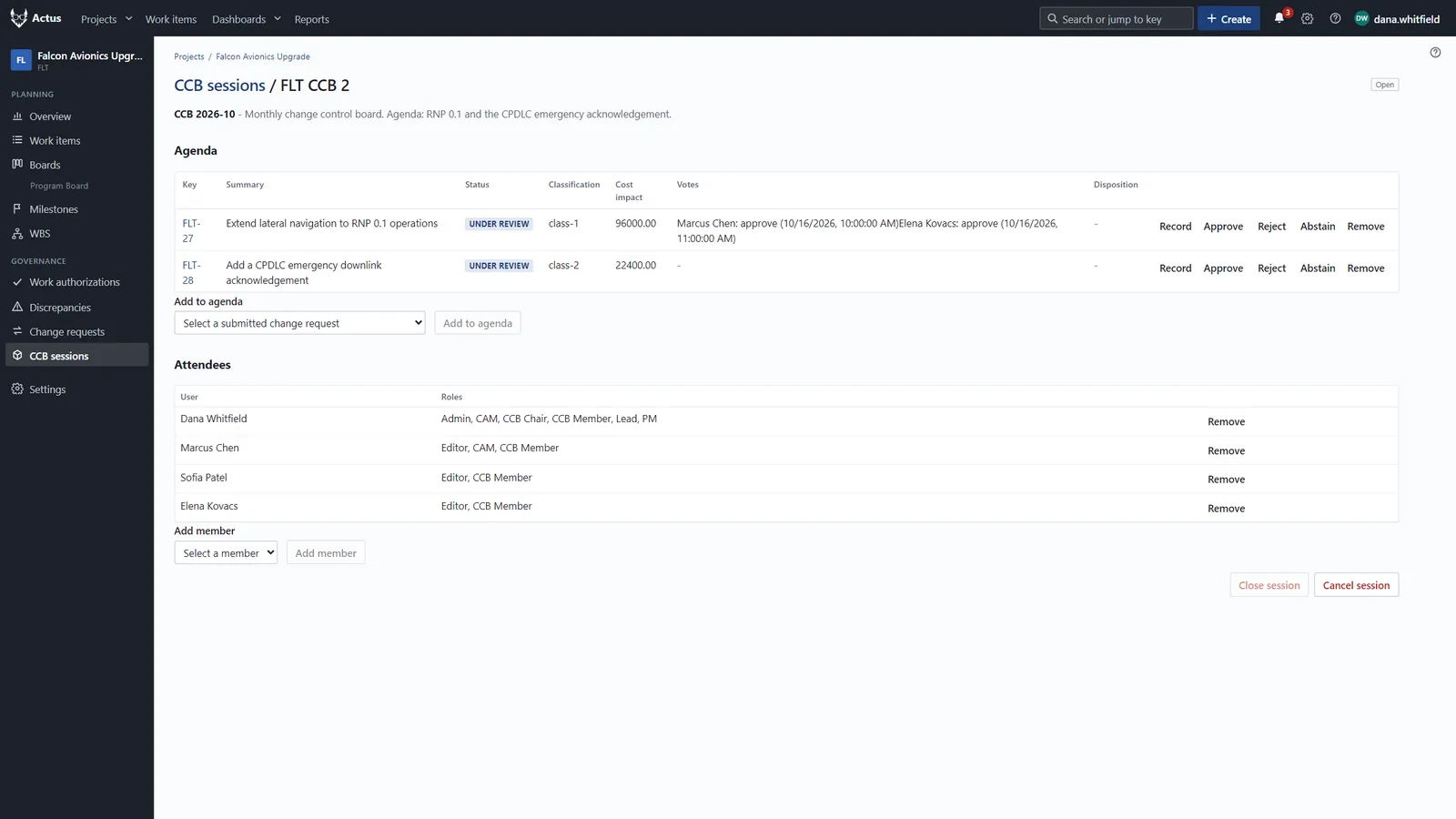
Change requests go on a change control board agenda and receive a signed disposition from a facilitator, or from a quorum roll-call vote with a chair override. Discrepancy reports carry P1 to P5 severity; for the severities you gate, work cannot start until containment is signed, and the report cannot resolve without a root cause and a signed corrective action plan.

  • CCB sessions with agenda, votes and dispositions
  • Discrepancy, problem and failure reports
  • Severity gates for containment, root cause and CAP
Change control →
Change control board session with a change request on the agenda and its recorded votes
06 / Security & deployment

Your network, your identity provider.

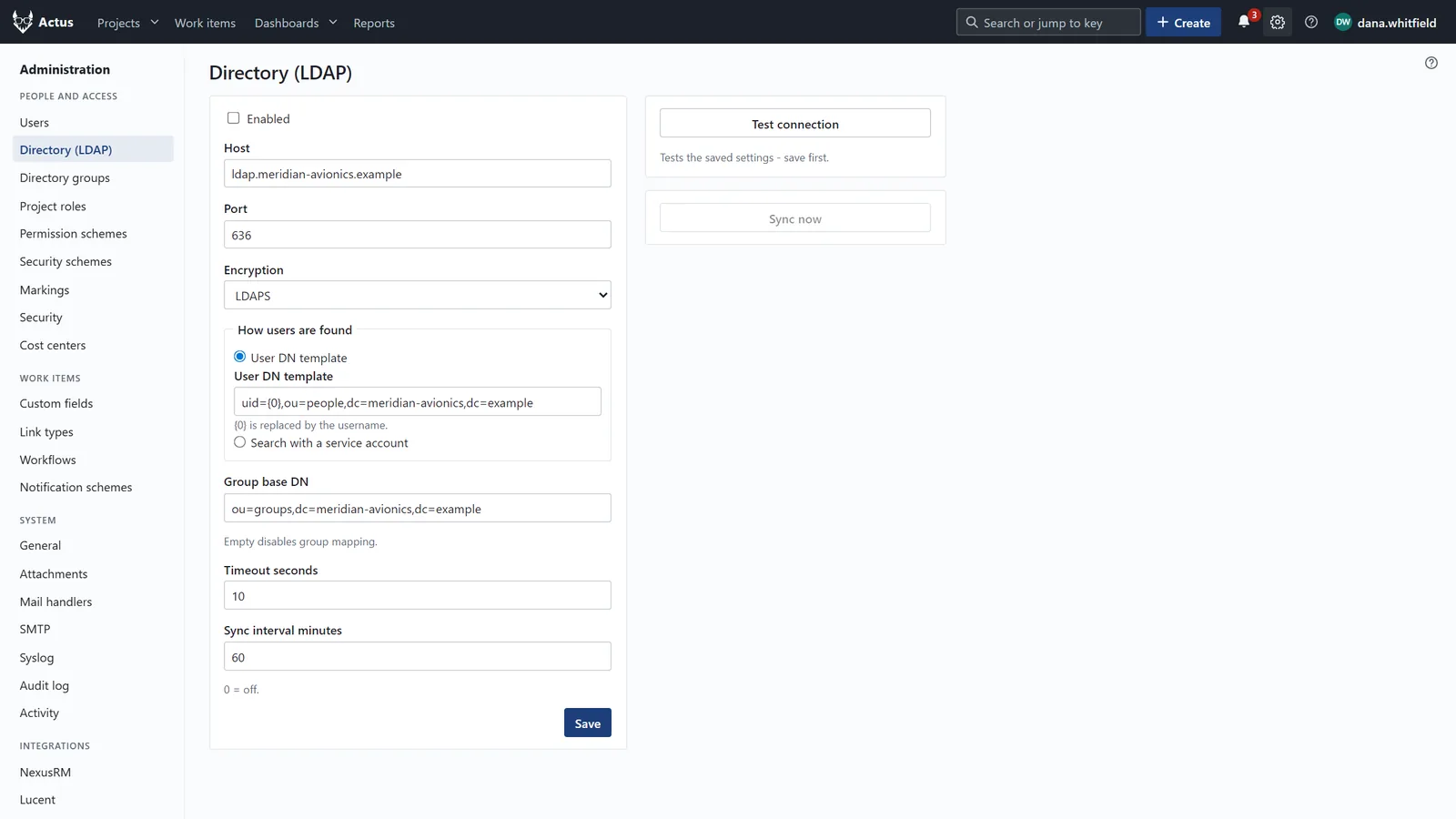
Actus runs as a Docker Compose stack of the application and PostgreSQL 16, or as a Helm chart, and makes no outbound calls at runtime. Sign in with local accounts, LDAP or Active Directory, OpenID Connect, SAML or smart cards, with directory groups mapped to project roles.

  • Offline install bundle, two-node HA or Helm
  • LDAP, OIDC, SAML and CAC/PIV certificate sign-in
  • Hash-chained audit log with verification
  • FIPS mode with PBKDF2-HMAC-SHA256 passwords
Security and deployment →
Directory administration page with LDAP connection settings and group-to-role mapping
02 / And more

Familiar on day one. Connected when you need it.

Full feature catalog →

Migration

Guided Jira migration

Import a Jira Server or Data Center instance over its REST API or from a backup file (beta): dry run into staging, review the report, confirm in one transaction, then run deltas. Old Jira links redirect.

Migration and API →
Suite

NexusRM and Lucent

Link work to NexusRM requirements and see their live status and coverage, or request a Lucent review whose result signs off the work item.

Integrations →
Development

Git and CI activity

Commits, branches, merge requests and builds from GitLab, Gitea, Forgejo, Bitbucket Data Center, GitHub and Jenkins appear on the work items they mention.

Watch it with GitLab →
Automation

Rules, webhooks and mail

Automation rules on events, schedules or a button; signed outbound webhooks; inbound mail handlers that turn e-mail into work items and comments.

Automation →
API

REST, Jira-compatible API and MCP

An OpenAPI-described REST API, a Jira-compatible endpoint subset for existing scripts, and an MCP server for self-hosted AI agents, all under user-bound tokens.

Migration and API →
Help

Built-in help center

Searchable setup guides, walkthroughs and workflow diagrams served by Actus itself, with "Help for this page" links throughout the app. Works on an isolated network.

03 / Tour

See a program end to end.

A narrated walkthrough of a flight management system program: backlog and boards, work items and workflows, advanced query, work authorization, change control, discrepancy reports and deployment.

With NexusRM and Lucent: one change through all three →

With GitLab: a code change on its ticket →

04 / Licensing

Licensed per deployment. Free to try.

Actus is commercial software licensed per deployment under the Code Monster Software license agreement. It runs on your own network and checks its license file locally, with no call home.

Trial

Try it free for 30 days

Create an account, download the latest release and get a 30-day trial license for Actus, NexusRM and Lucent. Install it offline on your own hardware.

Start your trial →
Paid

Production at program scale

Production deployments take a commercial license that includes support, offline upgrade bundles and a say in the roadmap. Custom features are quoted at a fixed price and built into the product.

Ask for current terms →
Yours to keep

Licensed versions keep running

A license covers every version released before its subscription end date, and those versions keep running after the subscription ends. There is no call home and nothing switches off remotely.

05 / FAQ
Does Actus require a cloud connection?

No. Actus runs on your own servers as a Docker Compose stack (the application and PostgreSQL 16) or a Helm chart, and makes no outbound network calls at runtime. Optional integrations only call the servers you configure. For an air-gapped network, install from the offline bundle.

Can we move over from Jira?

Yes. The built-in migration imports a Jira Server or Data Center instance over its REST API, or from a backup file (beta: built to Atlassian's documented backup format; always start with a dry run). A dry run imports into a staging database so you can review the report first; the confirmed run imports in one transaction, and delta runs keep it current until cut-over. Old Jira issue links redirect to the matching Actus work items.

Do we have to use the governance features?

No. Work authorization, change control and discrepancy gates are switched on per project. A Scrum, Kanban or Lean R&D project works like a familiar tracker; a Formal EVMS or Mission-Critical project starts with the governance it needs.

Which sign-in methods are supported?

Local accounts, LDAP and Active Directory, OpenID Connect (including Centrum), SAML 2.0 and smart card (CAC/PIV) client certificates. Directory groups map to project roles, and electronic signatures re-authenticate the signer.

Where does our data live?

On your hardware, in your PostgreSQL database and application volume, or in an S3-compatible store on your own network for attachments. Nothing is sent to us or anyone else.

Do our Jira marketplace apps come across?

No. The migration brings your instance's projects and work items across; app data and app behavior stay behind. In the dry run we go through the apps your instance uses, so you can see what Actus covers natively and what would need a custom feature before you commit.

Why not move to Atlassian's cloud?

If your program can use a cloud service, that may be the simpler path. Actus is for networks that can't: Atlassian has said a fully disconnected deployment is in design but has published no date, and Data Center goes read-only on 28 March 2029.

What happens if Code Monster goes away?

Every version your license covers keeps running on your own servers with no call home, so nothing stops if we do.